
Checkout abandonment is the moment your business loses money it already earned. A shopper picked a product, added it to their cart, and started the process of paying you. Then they stopped.
Baymard Institute puts the average documented online shopping cart abandonment rate at 70.22%, a figure calculated by averaging results across 50 different studies rather than measuring one retailer or one platform (Baymard, cart abandonment rate (opens in new tab)). That number is close to an industry constant.
The instinct when a checkout underperforms is to check load times first. Speed is a real lever, and it has a place here. But when Baymard asked shoppers why they actually abandoned checkout, speed wasn’t the top reason, the second reason, or the third. Cost, delivery timing, and trust beat it by a wide margin, and two of the top four causes are policy decisions a merchant can change without touching a line of code.
If you’re trying to figure out which of these applies to your store, that’s exactly the kind of diagnostic work a checkout optimization audit is built to answer.
The real reasons for checkout abandonment
Baymard’s abandonment research asks shoppers who left checkout why they left, and publishes the breakdown by reason. This is the list that should set your priorities, not a gut feeling about your site’s PageSpeed score.
- Extra costs too high (shipping, tax, fees): 40%
- Delivery was too slow: 20%
- Didn’t trust the site with credit card information: 19%
- The site wanted an account created: 18%
- Checkout process too long or complicated: 17%
- Website had errors or crashed: 17%
- Returns policy wasn’t satisfactory: 13%
- Couldn’t see or calculate total order cost up front: 12%
- Credit card was declined: 10%
- Not enough payment methods: 9%
Source: Baymard, cart abandonment rate (opens in new tab). Baymard doesn’t publish a sample size or survey date for this specific breakdown, so treat the percentages as a documented ranking rather than a number you can plug into your own revenue model. These ten figures total well past 100%, which means shoppers could select more than one reason. Checkout abandonment causes stack rather than compete for a single vote.
Look at what’s actually on that list. Cost transparency shows up twice: 40% cite extra costs directly, and another 12% couldn’t calculate their total before reaching payment. That’s effectively the same problem stated two ways.
Forced account creation sits at 18%, and on most platforms that’s a single setting, not a development project. Three of the top four causes are disclosure and policy decisions. The closest thing to a performance complaint, “website had errors or crashed,” sits at 17%, tied for fifth. It’s real, but it’s not close to the top of the list.
How much a checkout actually involves, and where abandonment creeps in
A checkout has far more surface area than a ten-item fix list suggests. Baymard’s separate checkout usability benchmark doesn’t just measure abandonment reasons. It scores checkouts against a documented set of design guidelines, grouped into 17 topic areas, and states there are “110+ checkout guidelines” in total (Baymard, checkout usability (opens in new tab)).
- Customer & Address Information: 12 guidelines
- Shopping Cart & “Added to Cart” Behavior: 11 guidelines
- Shipping & Store Pickup: 11 guidelines
- Credit Card Form: 10 guidelines
- Form & Page Design: 10 guidelines
- User Interactions & Distractions: 10 guidelines
- Validation Errors & Data Persistence: 10 guidelines
- Account Selection & Creation: 9 guidelines
- Payment Flow & Methods: 8 guidelines
- Field Design & Features: 8 guidelines
- Default Values & Autocompletion: 8 guidelines
- Field Labels & Microcopy: 7 guidelines
- Gifting Flow & Features: 5 guidelines
- Order Review: 5 guidelines
- Order Confirmation & E-Mail: 4 guidelines
- Cross-Sells: 4 guidelines
- Checkout Types: 3 guidelines
That’s the actual scope of “checkout” as a design problem. It isn’t one page. It’s dozens of smaller decisions stacked together, spanning everything from how an address field autocompletes to how a gift message gets entered, and each one is a place a shopper can decide to leave.
The heaviest topics aren’t a surprise given what the checkout abandonment data already shows. Customer & Address Information, Shopping Cart behavior, and Shipping & Store Pickup carry 34 guidelines between them, more than any other three topics combined. Those are where shipping cost, delivery estimates, and address-driven tax calculation live, the same territory the 40% extra-costs and 20% slow-delivery causes point straight at.
Some of the smaller topics matter more than their guideline count suggests. Checkout Types carries only 3 guidelines, but it governs the one-page-versus-multi-step decision covered later. Validation Errors & Data Persistence carries 10 of its own, which is more design attention than most stores give the moment a form submission fails.
How to reduce cart abandonment by fixing cost transparency first
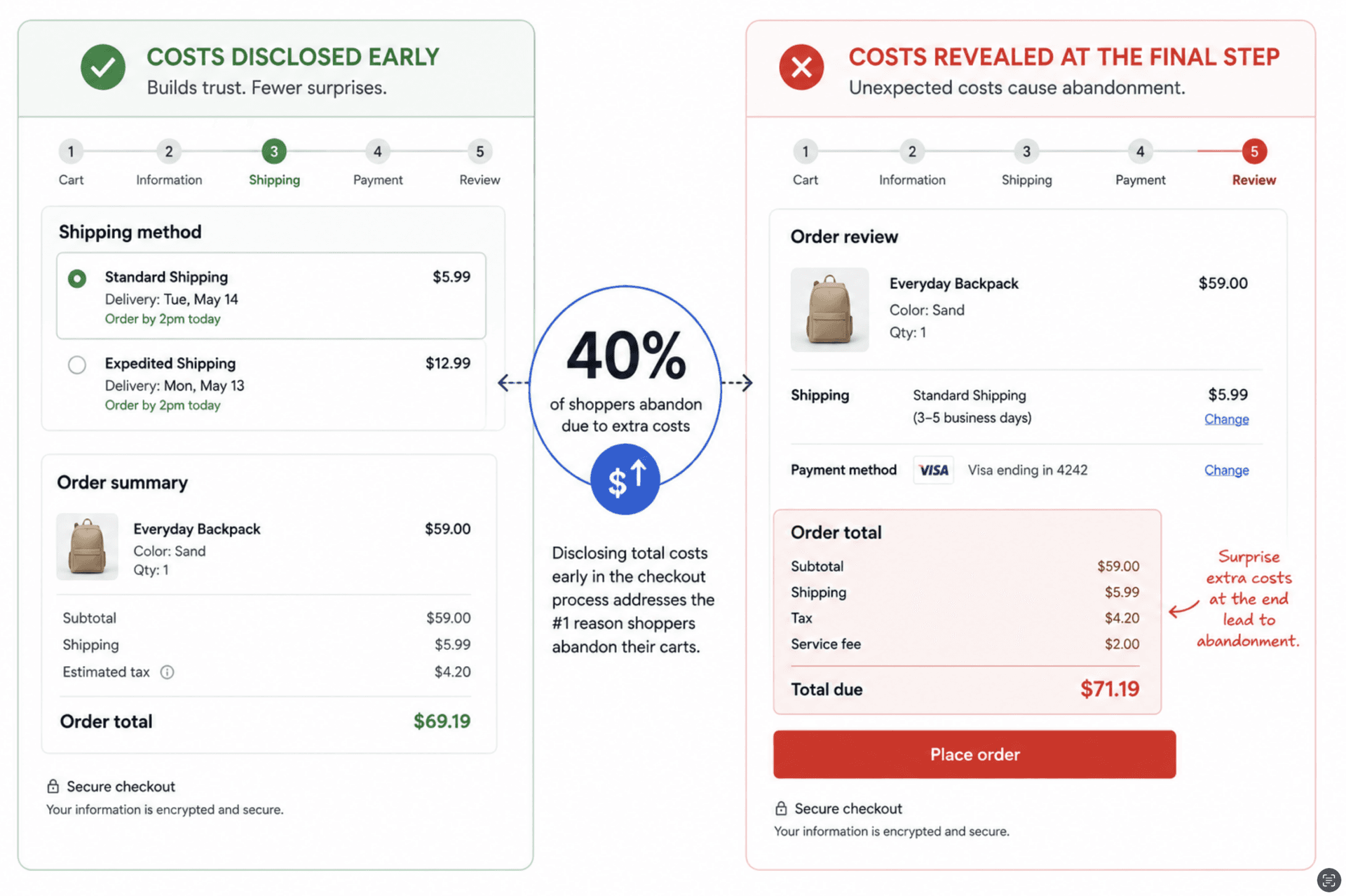
If you want to reduce cart abandonment and you can only fix one thing, fix what the shopper sees about cost. Extra costs are the single largest documented reason people leave checkout, and the fix is disclosure, not discount. Shoppers aren’t necessarily rejecting your shipping fee. They’re rejecting finding out about it for the first time on the last screen.
The practical version of this: show an estimated shipping cost on the product page or cart page, before checkout starts. If you have a free-shipping threshold, state it clearly and show progress toward it in the cart. If tax varies by state, show an estimate as soon as the shopper enters a shipping address, not after they’ve filled out a payment form.
The 12% of shoppers who couldn’t calculate their total order cost up front are a subset of the same problem. A running order total that updates as the shopper adds shipping options, applies a discount code, or changes quantity removes the guesswork that pushes people to abandon at the last step. This is a cart and checkout-page change, not an engineering sprint.
Delivery timing deserves its own line item because it’s the second-largest cause at 20%, and it’s often conflated with cost. A shopper who sees “$8.99 shipping, arrives in 7 to 10 business days” is reacting to both the price and the wait. Showing an estimated delivery date, not just a shipping method name, gives shoppers the information they’re actually trying to get before they decide to leave.
A shipping method label answers a logistics question the shopper didn’t ask. “Standard” or “Ground” tells them nothing about when the box arrives. A calculated date range, built off a stated cutoff time for same-day processing, answers the actual question and does it without any added cost to disclose. Showing that cutoff clearly, “order within the next 3 hours to ship today,” also gives shoppers a reason to finish now instead of leaving the tab open.
Returns policy is a quieter cause at 13%, but it compounds the cost objection rather than sitting apart from it. A shopper weighing a $60 pair of boots against an $8.99 shipping fee is also silently asking what it costs to send them back if they don’t fit. Stating the returns window and whether return shipping is free or deducted from the refund, visibly at checkout rather than buried in a policy page, closes that loop before it becomes a reason to abandon.
Credit card distrust, at 19%, is a trust-signal problem more than a security problem. Familiar payment options like Shop Pay, PayPal, and Apple Pay carry brand recognition that a generic card form doesn’t. Displaying your payment processor’s badge and keeping the shopper on a checkout URL they recognize both address this directly.
Where validation errors and declined cards drive checkout abandonment
“Website had errors or crashed” ties for the fifth-largest documented cause of checkout abandonment at 17%, level with “too long or complicated.” Baymard’s guideline framework treats this as its own discipline, Validation Errors & Data Persistence, with 10 dedicated guidelines, roughly the same weight the framework gives the entire credit card form. That’s a signal this isn’t a QA afterthought. It’s a design category on par with payment itself.
An error that surfaces only after the shopper clicks “place order,” on a form that then wipes every field back to blank, turns one mistake into a reason to leave entirely. Inline validation that flags a problem as the shopper types, or immediately on leaving a field, catches the same error without the reset.
Preserving whatever the shopper already entered when a submission does fail is the other half of the fix. Re-typing a full address after one bad zip code is exactly the kind of friction that reads to the shopper as “the site is broken.”
Field-level messaging is the third piece. “Something went wrong” tells a shopper nothing they can act on. “Card number must be 16 digits” tells them exactly what to fix and lets them finish the order in the next ten seconds instead of abandoning it.
Card declines, at 10%, are a related but distinct cause, and they’re common even on checkouts with no bugs at all. A decline for insufficient funds and a decline for a mistyped CVV look identical to most checkout forms, but they call for different responses from the shopper. Messaging that distinguishes between “check your card details” and “try a different payment method” gives the shopper a next step instead of a dead end, and a checkout that lets them retry with a second card or wallet without re-entering their shipping information keeps that recovery path short.
“Not enough payment methods,” at 9%, is the smallest of the ten causes individually, but it sits right next to the decline problem rather than apart from it. A shopper whose card gets declined and who has no second payment option on the page has nowhere to go but away. Offering at least one alternative, a digital wallet or a buy-now-pay-later option alongside standard card entry, turns a decline from a dead end into a recoverable moment.
Guest checkout: closing an 18% abandonment cause with one setting
Forced account creation causes 18% of documented checkout abandonment, which puts it ahead of “too long or complicated” and close behind credit card distrust. It’s also the easiest fix on this entire list. Guest checkout means a shopper can complete a purchase without creating a password, verifying an email up front, or filling out a profile they didn’t ask for.
Every major platform serious ecommerce brands run on, Shopify, WooCommerce, Adobe Commerce, and BigCommerce, supports guest checkout as a configuration option rather than a custom build. If your store currently requires an account before checkout, that’s a setting to revisit this week, not a project to scope for next quarter. You can still offer account creation after the order is placed, when it’s optional instead of a gate.
The instinct to require accounts usually comes from wanting more email addresses for marketing, or wanting return customers to have order history saved. Both are legitimate goals. Neither is worth losing nearly one in five checkouts to get. Capture the email at checkout regardless of account status, and offer account creation as a one-click option on the order confirmation page instead of a requirement to purchase.
One page checkout: what it fixes and what it doesn’t
One page checkout addresses the 17% of shoppers who abandon because the process feels too long or too complicated. Consolidating the information, shipping, and payment steps into a single scrollable page, instead of three separate page loads with three separate “continue” buttons, reduces the sense of a long process even when the same fields are being collected.
Where one page checkout falls short is assuming it will fix problems it wasn’t built for. Consolidating steps doesn’t disclose a shipping cost the shopper hasn’t seen yet. It doesn’t build trust in your payment security. It doesn’t remove a forced account wall if that requirement is still active.
A single-page layout wrapped around undisclosed costs and a mandatory account is still going to lose the shopper at those specific moments, just on a shorter page.
Merchants looking at a Shopify one page checkout setup should know it’s already the default. Per Shopify’s own changelog (opens in new tab), merchants on the Basic, Shopify, and Advanced plans “can now use the theme editor to choose between the one-page checkout (default) or three-page checkout,” and Plus merchants manage the same choice through the checkout editor.
That means one page checkout on Shopify is a setting you already have rather than a build you commission. It also means it’s reversible. Shopify states customizations and checkout settings “will migrate seamlessly from one layout to the other,” so testing three-page against one-page is a realistic experiment rather than a one-way door. WooCommerce and Adobe Commerce merchants typically need a dedicated plugin or extension to get the same consolidation, since their default checkout flows are more modular.
One page checkout is a real lever for the “too long or complicated” 17%. Treat it as one fix among several, applied after cost transparency and account requirements are already handled, not as a replacement for either.
What to measure once the big checkout abandonment causes are fixed
Once you’ve addressed cost transparency, delivery timing, trust signals, and guest checkout, the next question is what to track to know if it’s working. Checkout conversion rate, the percentage of shoppers who start checkout and complete an order, is the number that matters here. It’s a more useful number than overall cart abandonment rate, because it isolates the part of the funnel you’re actually trying to fix.
Track it in stages if your platform allows it: cart-to-checkout-start rate, checkout-start-to-payment rate, and payment-to-order-complete rate. A drop concentrated at one specific stage tells you which Baymard cause is most likely active on your store. A steep drop right after the shipping step, for example, points straight at cost transparency or delivery timing, not at page load speed.
Before you assume checkout is even where you’re losing shoppers, it’s worth confirming with actual funnel data rather than a guess. A conversion funnel analysis will show you whether the drop-off is happening at checkout at all, or earlier, on the product page or in the cart itself. And if you already know checkout is the problem but you’re not sure which of these causes applies to your store, a conversion rate optimization audit is the next step. Guessing which of ten documented causes applies to you wastes more time than measuring it.
Shopify checkout optimization: the August 26, 2026 script tag deadline
There’s a dated, concrete change for Shopify merchants that belongs in any shopify checkout optimization conversation right now. Shopify’s own developer documentation states that checkout.liquid is unsupported for the Information, Shipping, and Payment checkout steps, and that checkout.liquid and additional scripts were sunset for the Thank You and Order Status pages on August 28, 2025 (Shopify.dev, checkout.liquid architecture (opens in new tab)).
That earlier date applied to Plus stores. The one still ahead applies to everyone else. Shopify’s documentation states that script tags were sunset on the Thank You and Order Status pages for Plus stores on August 28, 2025, “and are sunset for non-Plus stores on August 26, 2026.”
If your store still relies on script tags injected into the Thank You or Order Status page, that’s the functionality affected on that date, not your entire checkout. Common uses of script tags on those specific pages include post-purchase tracking pixels, upsell scripts, and survey widgets that fire after an order completes. Shopify’s documented replacement path is to move that functionality to Shopify Extensions in Checkout, built through the checkout and accounts editor rather than injected script tags.
If you don’t know whether your store, or a theme or app a past developer installed, still uses script tags on those pages, that’s worth checking against the August 26 date rather than assuming. This is a narrow, well-documented change with a specific fix, not a reason to rebuild your entire checkout flow.
Ecommerce checkout best practices, ranked by impact
Pulling this together into a working list of ecommerce checkout best practices, ordered by the share of abandonment each one addresses according to Baymard’s data:
- Disclose shipping cost, tax, and fees before the final step, addressing the 40% who cite extra costs
- Show an estimated delivery date and processing cutoff time, not just a shipping method name, addressing the 20% who cite slow delivery
- Display recognizable payment options and processor badges, addressing the 19% who don’t trust the site with card details
- Enable guest checkout so an account isn’t required to buy, addressing the 18% who abandon over forced account creation
- Consolidate checkout into fewer, shorter steps, addressing the 17% who find it too long or complicated
- Add inline form validation and preserve entered data on failed submissions, addressing part of the 17% who hit errors or crashes
- State your returns policy and return-shipping terms clearly at checkout, addressing the 13% who find it unsatisfactory or unclear
- Show a running order total that updates as options change, addressing the 12% who couldn’t calculate their total up front
- Give a clear, actionable message on declined cards and offer a fast retry path, addressing the 10% who hit a decline
- Offer more than one payment method, including a digital wallet or buy-now-pay-later option, addressing the 9% who found the options too limited
- Optimize checkout page performance, addressing the smaller, real share tied to speed and reliability
That order isn’t arbitrary. It’s the Baymard checkout abandonment breakdown translated directly into a to-do list, largest documented cause first.
Where page speed actually fits among checkout abandonment causes
None of this means speed doesn’t matter. Baymard’s separate checkout usability benchmark, which manually reviews checkout flows against 110+ guidelines across 17 topic areas, found that 65% of sites have a performance rating of “mediocre” or worse, and only 2% achieve a “good” rating (Baymard, checkout usability (opens in new tab)). That’s a real, widespread problem. It’s also a separate finding from the checkout abandonment reasons breakdown above, and the two shouldn’t get merged into one number.
The honest read of both data sets together: performance is worth fixing, and most stores are behind on it, but it’s not the first place to look if checkout abandonment is high and you haven’t audited cost disclosure, delivery estimates, trust signals, or account requirements yet. Fix those four first. Then treat checkout page optimization, faster page loads, fewer render-blocking scripts, quicker response after the shopper clicks “place order,” as the next layer, not the first one.
For Shopify stores specifically, Core Web Vitals work is the natural home for this. It’s also worth testing rather than assuming. A checkout change that looks obviously better, a shorter form, a faster page, a different button color, doesn’t always move completion rate the way it looks like it should. Running it as an A/B test instead of a blanket rollout tells you whether it actually worked before you commit to it everywhere.
Diagnosing your own checkout abandonment
The ten reasons in Baymard’s data don’t all apply equally to every store. A subscription brand with a loyal repeat customer base might see very little checkout abandonment from forced account creation and a lot from delivery timing. A store selling internationally might see cost transparency dominate, because tax and duty estimates are harder to show up front.
The list is the same for everyone. The mix isn’t.
That’s the actual diagnostic work: figuring out which of these ten causes is doing the most damage to your specific checkout, in what order, before spending a development budget on the wrong one. A checkout optimization audit exists to answer exactly that question with your own funnel data instead of an industry average.
If you’re heading into a high-traffic season and want to know your checkout will hold up under real load in addition to converting well, stress-testing your Shopify store before peak season covers the operational side of that question. Checkout abandonment and checkout uptime are related problems, but they’re not the same audit. For a broader look at where conversion rate optimization fits into the rest of your funnel, the CRO work covers cart, product page, and checkout together.

Cookie Consent Built for Brand Trust and Compliance
Let’s talk about something super important for your website and your relationship with your visitors: cookie consent. A few years ago, cookie consent could feel like a simple banner you install and forget. Today, it’s a moving target. More U.S. states have enacted comprehensive privacy laws, enfo…

Make Your Shopify Store Look Nothing Like a Shopify Store
Shopify sells hundreds of themes to millions of merchants. The arithmetic is why so many stores look alike, and why three specific layers are what separate a brand from a theme with the colors swapped.

Common Accessibility Gaps in Content Workflows (And How to Fix Them)
We audit dozens of websites every month for accessibility compliance. And while we see plenty of developer-side issues like keyboard navigation problems, ARIA misuse, and focus management, the most persistent barriers come from the content side. These aren’t malicious oversights. They’re the resu…
Not sure where the gap is? That's exactly what the Digital Marketing Growth Audit is for.
A free, no-obligation look at where your site can win more traffic and conversions, with a clear digital marketing roadmap to get there. Just a straight read on where your digital presence stands and where it's headed.