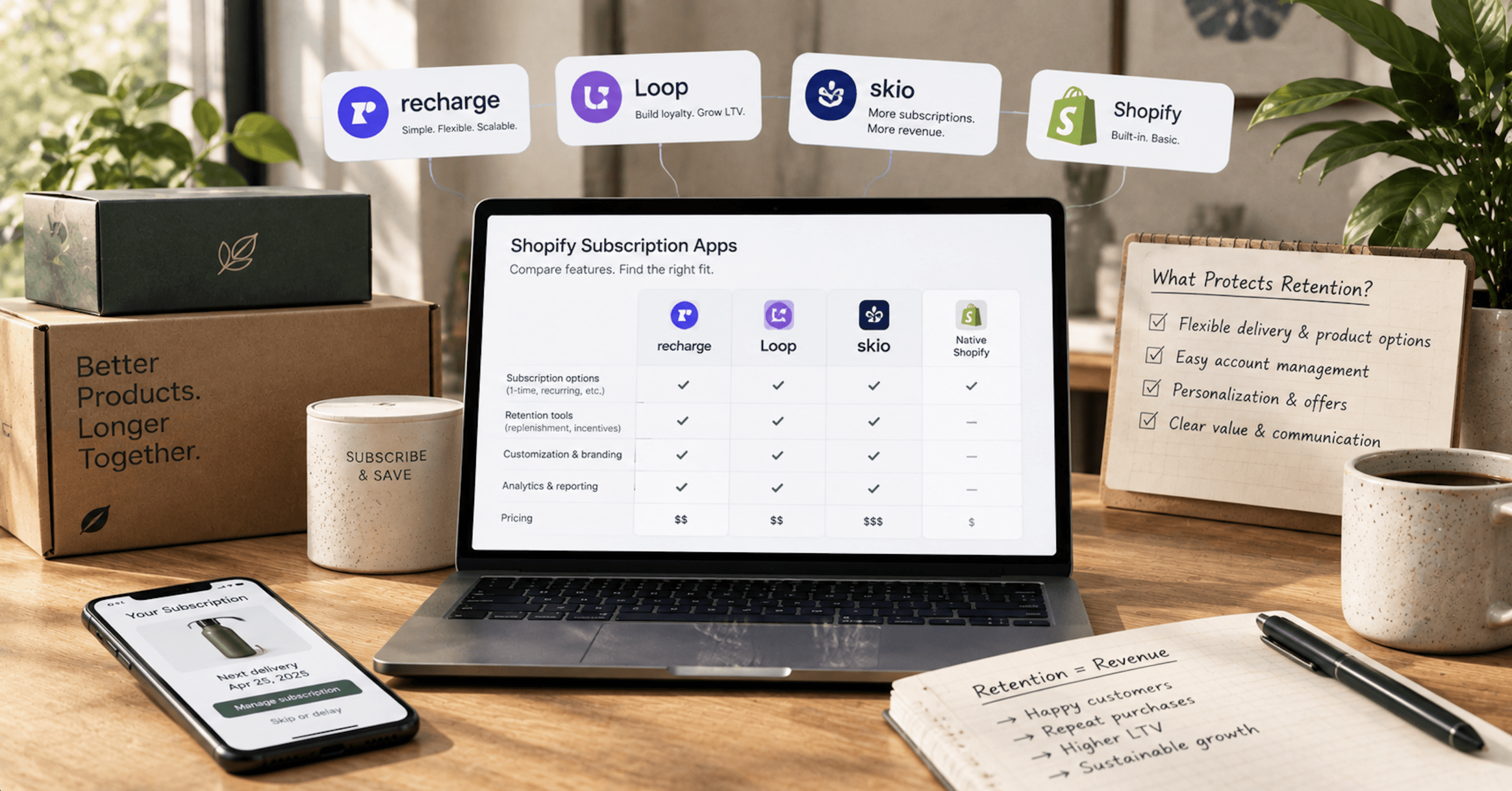
Two of the names on most subscription shortlists now belong to the same company. Recharge acquired Skio in April 2026, and the app now sits on the Shopify App Store as Skio, a Recharge Company (opens in new tab). A shortlist of Recharge, Loop, Skio and Shopify Subscriptions has three owners, not four.
None of these four vendors publishes methodology behind its performance claims. Pricing on all of these apps moves, so re-check the figures before you sign anything.
We build and migrate these stacks for Shopify brands, and the decision almost never turns on the feature grid. It turns on two questions that don’t come up on a demo call: what your app does when a customer’s card declines, and what it costs you to leave eighteen months from now.
Recharge Owns Skio, So The Best Shopify Subscription App Shortlist Has Three Owners
Recharge announced in April 2026 that Skio is joining the Recharge team. Recharge’s scale claim for the combined company has no independent audit behind it: “Together, we power more than 20,000 brands and process over $20B in GMV, annually.”
For merchants on both platforms, Recharge said at the announcement that “nothing is changing today.” It said that both platforms would keep operating as they had, that your existing team would stay your point of contact, and that it would be reviewing elements of both platforms over the coming months. On the roadmap, Recharge said “More details on the combined roadmap are coming in the months ahead.”
Recharge repeated the 20,000-merchant and $20B GMV figures (opens in new tab) in its press release of April 30, 2026. Recharge hasn’t published a deal value.
Is Skio still an independent company? No. Recharge says both platforms will continue to operate as they have, and the two still ship as separate App Store listings today.
But choosing between them means choosing between two products under one owner, and Recharge said at the acquisition that details of the combined roadmap were still to come. If you’re about to sign an annual commitment on Skio, that roadmap position is a fair thing to ask for in writing.
What Leaving Each Shopify Subscription App Costs You
On Shopify Checkout, the subscription contract and the tokenized payment method are Shopify objects, not app objects. Shopify says uninstalling a third-party subscription app deletes the subscription data created in the app after 48 hours, and subscription contracts and customer payment information are specifically excluded from that deletion (opens in new tab).
That exclusion is the whole reason app-to-app migration is possible on Shopify at all. It’s also why exit cost varies so much between these four: the contract layer is portable, and everything each vendor built on top of it is not.
Recharge's Shopify Checkout Conversion Is A One-Way Door
This applies only to stores still on the legacy Recharge Checkout. Install Recharge fresh today and you land on the Shopify Checkout Integration from the start, so none of it reaches you. For a legacy store, the conversion from Recharge Checkout on Shopify to the Shopify Checkout Integration (opens in new tab) runs one way, and Recharge is blunt about it.
Due to contracts between Recharge and Shopify, once a store is converted to the Shopify Checkout, Recharge cannot revert the store back to the Recharge Checkout.
Recharge publishes no calendar sunset date for the legacy Recharge Checkout, but it does publish the deprecation itself. Recharge Checkout on Shopify is a deprecated version of the app, and a store still on it must convert to the Shopify Checkout Integration to process new checkout orders. So the conversion isn’t optional, only unscheduled. Treat it as the checkout optimization work it partly is, because your subscription conversion path changes with it.
Three constraints land on the day you convert. Customers can’t be added manually to the Shopify Checkout with payment methods entered afterward, because all new customers need to complete an online checkout through Shopify’s Checkout page so their payment information is stored and tokenized appropriately. SKU isn’t available as a condition, search or action in Recharge Workflows. And stores processing more than 10,000 orders per day risk hitting Shopify’s API throttle limit.
Two more hit merchandising directly. Different shipping rates for one-time versus subscription products sit in open beta, and duplicate shipping rates currently show at checkout for subscription products with different frequencies. Separately, Recharge’s SMS opt-in has to live on the cart page rather than the checkout page under the Shopify Checkout Integration.
Two Live Payment Relationships, Indefinitely
This is a consequence of converting, not of using Recharge. The part of the conversion with no end date attached is the payments arrangement. Existing subscribers keep processing through your legacy provider, whether that’s Stripe, Braintree or Authorize.net, while new customers process through Shopify Payments or another eligible subscription gateway. You have to keep both your legacy payment provider and your Shopify Payments accounts connected and active.
So a converted store runs two payment relationships for as long as any pre-conversion subscriber is still active. Card updates, gateway key rotations and reconciliation all happen twice. That’s a permanent operational line item, and it doesn’t show up on any pricing page.
No Shopify Subscription App Owns Your Payment Tokens
If you’re migrating away from Recharge (opens in new tab) and leaving Shopify while using a Shopify payment method like Shopify Payments, you need to contact Shopify Support to get those payment tokens, and Shopify’s export method for payment tokens is a one-off service that may come with a charge. Some token data, such as the customer_payment_method_id, may be stored with your payment processor, and you have to reach out to the processor directly to get it.
Skio doesn’t store payment method data in its own database (opens in new tab). The data sits with the payment processor, and Skio uses the processor’s API to associate the right token with the subscription in Shopify. Because it never holds the tokens, it can’t move them between two different processors. Skio advertises payment token mapping (opens in new tab) across Shopify Payments, Stripe, Braintree, PayPal and Authorize.net, which reads considerably stronger than that mechanism.
Loop hits the same wall from the other side. Shopify doesn’t allow payment tokens to move across two Shopify stores, so Loop uses placeholder tokens (opens in new tab) in that scenario and customers are prompted to update their card at the next billing attempt.
Can you switch apps without making customers re-enter their cards? Within one Shopify store, on Shopify Checkout, usually yes, because the contract and the payment method stay on Shopify’s side of the line. Across two Shopify stores, or across two different processors, the default answer is no.
Loop and Skio each point to a paid escape, though. Loop names a Shopify PAN migration service, a paid option it puts at around $16,000, that can transfer tokens between stores, and Skio points to a Shopify Payments team transfer path. One case stays open: Skio’s team can’t migrate ShopPay payment methods from one store to another (opens in new tab), and Skio says it isn’t currently clear whether Shopify’s own Payments team can. Portability is bounded by the processor and the store, not by the app’s goodwill.
The Free Shopify Subscription App Has The Harshest Uninstall
Shopify says uninstalling Shopify Subscriptions (opens in new tab) means you can no longer view or access the app’s features, and the subscription plans and contracts created in the app, along with any discounts that use Shopify Subscriptions, are deleted and no longer accessible. A request also goes to the app developer within 48 hours to delete all personal customer information.
For third-party apps, contracts and payment information are excluded from deletion. For the free first-party app, Shopify says contracts created in it are deleted. Same platform, different exit.
Recharge sits at the other extreme, and its risk runs the opposite direction. Canceling your ecommerce store, such as Shopify or BigCommerce, won’t automatically stop activity on your Recharge account, because they’re separate systems. Recharge puts it plainly: “Until you formally cancel, Recharge continues processing existing subscription orders.” And: “The account must be cancelled or billing will continue. It is important to cancel your account before subscriptions become enabled on the new provider to avoid double-billing your customers.”
Two more Recharge exit details cost time rather than money. Recharge doesn’t have a built-in notification to alert customers that subscriptions will be ending, and its policy leaves that to you: “It is the responsibility of the store owner to alert customers of any changes or cancellations to their subscriptions.” Canceling an account or deactivating a flow doesn’t remove customers already inside that flow, so they keep receiving emails until they finish it, and any custom code such as Ajax calls pointing at the Recharge checkout has to be removed by you.
Recharge’s own recommended export list before you leave is the checklist to run on any vendor:
- Subscriptions, all
- Charges, queued
- Customer payment tokens
- Payment methods, all
- Customer records
- Orders, prepaid queued
- Orders, prepaid processed
What Migrating In Actually Involves
Loop’s migration runs in three steps (opens in new tab): customer migration, payment import and subscription import. Customer migration is required only when you’re coming from a non-Shopify platform, and payment import is required either from a non-Shopify platform or from a legacy checkout such as Bold v1 or Recharge on legacy checkout. Loop’s rule of thumb is roughly one hour per 800 contracts, migrated subscriptions keep their created_at, cancelled_at and paused_at dates, and historical order data doesn’t come across during a subscription migration. Loop’s White Glove Migration is available on its paid plans at no extra charge, and Loop recommends self-serve only below 50 subscriptions.
Skio’s model is different in a way that changes your cutover plan. Skio copies subscription data in rather than moving it (opens in new tab), so the old subscription program keeps existing until you delete the legacy app, and you have to cancel, delete or disable billing on the previous platform yourself. Canceled subscriptions can’t be migrated at all. Any subscription that arrives without a valid payment method routes automatically into Skio’s Payment Recovery system.
Recharge gates migration help behind its mid tier. End-to-end migration support and hands-on implementation (opens in new tab) sit on Plus, not Starter. If you’re moving several thousand contracts onto Starter, the migration is yours to run.
How Each Shopify Subscription App Handles A Failed Card
Dunning is the retry logic your app runs when a subscriber’s card declines. It’s the difference between a customer who never noticed their card expired and a customer whose subscription quietly ended. All four apps do it. Three of the four let you set the intervals and the terminal action, and one doesn’t, which is the difference that decides more than the feature grid does.
Recharge's Shopify Subscription App Doesn't Expose Retry Intervals
Recharge says its Failed Payment Recovery (opens in new tab) uses smart retry technology rather than a fixed schedule, with retry timing adjusted dynamically based on factors including the payment error type, customer behavior and historical performance across merchants. Merchants don’t configure the intervals manually. If all retry attempts fail, the associated subscriptions are automatically canceled with the reason “Failed Payment flow max retries.”
One class of failure is carved out entirely: charges that fail with a hard-decline error code don’t enter the strategy. A stolen-card or account-closed decline never gets retried, which is correct behavior and also means your recovery rate is measured against a smaller denominator than you might assume.
Recharge markets the outcome as recovering up to 88% of failed payments (opens in new tab) with AI-powered retries and smart notifications. That’s Recharge’s own unaudited marketing claim, and Recharge publishes no methodology, sample size or measurement period alongside it. Treat it the way you’d treat any vendor’s uplift number.
An automated strategy tuned on cross-merchant data can beat a schedule a merchant configured badly and never revisited. Not exposing the intervals isn’t automatically worse. It does mean you can’t test them, can’t align them with your billing calendar, and can’t choose pause instead of cancel when retries run out.
Loop, Skio And Shopify Publish Retry Counts And Intervals
Loop’s Starter plan includes smart dunning management with 15 retries (opens in new tab) at the $99 tier. Retries run on a configured schedule (opens in new tab) until the payment succeeds or the maximum attempt count is reached, after which Loop takes the merchant’s chosen terminal action: skip the failed cycle and keep the subscription active, pause it, or cancel it. Loop’s own recommendation is pause. Merchants can also set a hard stop for specific failure reasons inside Payment Recovery, though hard-decline handling sits on Pro rather than Starter.
Shopify’s native app exposes the same three controls. Merchants set the number of retry attempts, the number of days between attempts, and the action taken when all attempts have failed (opens in new tab), choosing between skip, pause and cancel. The same billing-attempt logic covers both a failed payment capture and insufficient inventory, and a customer notification goes out in each case.
Two Shopify platform behaviors sit underneath all of this regardless of app. Billing runs the day after the subscription is due (opens in new tab), at 10:00 am store local time. And subsequent renewals fail (opens in new tab) if the original order was flagged as high risk and remains unfulfilled. A stalled fraud review on order one silently kills the rest of the contract.
How Skio Handles Retries
Skio publishes the most granular retry model of the four, and includes Payment Recovery Campaigns with Timing Optimization among its Scale features. Skio’s recovery campaigns (opens in new tab) are built from multiple retry phases, each with its own number of billing attempts and its own retry interval, rather than a single global retry limit. Skio’s own starting recommendation is a first phase set to a 3-day interval across 7 total attempts.
A Smart Retries toggle sits on top of that. With it on, Skio decides the time of day, day of week and day of month for each attempt, and your configured total number of retries is still respected while the interval may be adjusted. Discount codes can be applied automatically inside a chosen retry phase.
The dunning window ends when the subscription either renews successfully or is canceled. Skio includes Smart Payment Recovery (opens in new tab) on Scale, and a subscription migrated in without a valid payment method routes automatically into Payment Recovery.
Shopify Subscription App Pricing In 2026, Every Published Tier
The App Store isn’t the full price list for any of these vendors, and the gaps run in both directions. On the App Store, Recharge shows a $25 per month entry plan (opens in new tab) with no transaction fees for your first 50 subscribers, and that plan appears nowhere in the pricing on Recharge’s own site (opens in new tab). Recharge’s site carries a Custom volume-based tier that the App Store doesn’t show. Loop and Skio both publish Enterprise tiers on their own sites that the App Store stops short of.
| App | Free plan or trial | Published paid tiers | App-level transaction fee |
|---|---|---|---|
| Recharge | No free plan. 60-day free trial | $25/mo (App Store only), Starter $99/mo, Plus $499/mo, Custom volume-based (Recharge’s site only) | 1.49% + 19¢ on Starter, 1.34% + 19¢ on Plus. None on the $25 plan for the first 50 subscribers |
| Loop Subscriptions | Free Forever up to 50 active subscriptions. 14-day trial | Starter $99/mo, Pro $399/mo, Enterprise negotiable (Loop’s site only) | 1.0% on Starter, 0.75% on Pro, $0 per order on both |
| Skio | None published | Scale $599/mo billed monthly or $499/mo billed annually ($5,988/yr), Enterprise custom (Skio’s site only) | 1% + 20¢ on orders involving a subscription |
| Shopify Subscriptions | Free | None | None. Your payment gateway still charges its own processing rates |
External charges may be billed by Recharge separately (opens in new tab) from your Shopify invoice, which matters for anyone reconciling app spend out of Shopify billing alone.
The free-trial spread is the clearest asymmetry in the set. Recharge gives you 60 days, Loop gives you 14 plus a permanently free plan capped at 50 active subscriptions (opens in new tab), Skio shows no trial and no free tier (opens in new tab) on the App Store, and Shopify Subscriptions is free (opens in new tab). Skio’s annual commitment checks out arithmetically: $5,988 divided by 12 is exactly $499, and against $599 billed monthly over twelve months at $7,188, the annual plan saves $1,200, or 16.7%, which is the 17% saving Skio advertises.
What does a subscription app actually cost at your volume? Here’s our own math off the published list prices, applying each percentage to subscription order value and each cent fee per subscription order. At 1,000 subscription orders a month and a $60 average order value, so $60,000 in subscription volume: Recharge Starter (opens in new tab) runs $99 plus $894 plus $190, or $1,183, and Recharge Plus runs $1,493.
Loop Starter runs $99 plus $600, or $699, and Loop Pro runs $849. Skio Scale (opens in new tab) runs $1,299 on the annual rate and $1,399 billed monthly.
That’s a $484 monthly gap between Loop Starter and Recharge Starter at identical volume, or $5,808 a year, before anyone has compared a single feature.
At 10,000 subscription orders a month and a $50 average order value, Loop’s own worked example (opens in new tab) lands at roughly $4,149 a month on Pro, billed month to month. That’s Loop’s own example built on Loop’s own assumed order value, not an independent benchmark, and our arithmetic reproduces it: $500,000 at 0.75% is $3,750, plus the $399 platform fee. At that same volume, Recharge Plus at list price comes to $9,099 and Skio Scale on the annual rate comes to $7,499.
List price is unlikely to be what a merchant at 10,000 subscription orders a month actually pays. Recharge publishes a Custom tier with volume-based rates and Skio publishes an Enterprise tier, both of which exist precisely because the published percentages stop making sense at scale. Use list-price arithmetic to build your negotiating position, not your budget.
Two break-even points are worth calculating before you pick a tier, because both are pure arithmetic off the published rates. Recharge Plus overtakes Starter when the 0.15 point rate difference covers the $400 platform gap, which happens at about $267,000 a month in subscription volume. Loop Pro overtakes Starter at exactly $120,000 a month, where the 0.25 point difference covers $300. Below those lines, the cheaper platform fee wins and the upsell doesn’t.
App Store Listings Don't Identify The Best Shopify Subscription Apps 2026 Will Reward
Recharge launched October 14, 2014; Loop launched July 27, 2021; Skio launched April 27, 2021; and Shopify Subscriptions launched January 31, 2024.
A star average held across twelve years of reviews is a harder thing to hold than one held across five, and the star average alone hides that.
Shopify’s own app is free and first party.
The “What merchants think” summary block on these listings is generated by Shopify Magic. It’s machine-generated from reviews, not editorial, and it isn’t merchant testimony.
Where Each Shopify Subscription App Gates Its Features
Feature availability matters less than which tier it sits on, and that’s where the four diverge most cheaply.
| Capability | Recharge | Loop | Skio | Shopify Subscriptions |
|---|---|---|---|---|
| Bundles / build-a-box | Plus and above | Starter | Scale | Not compatible with the app |
| Prepaid subscriptions | Supported | Pro | Migrates with billing cycles preserved | Supported at platform level, billing cycles can’t be edited |
| Cancel-flow / save-offer builder | Starter and above | Starter | Scale | None published |
| SMS | Concierge SMS, Plus and above, plus per-segment charges | Email campaigns on Starter | SkioSMS one-way and two-way, included on Scale | Customizable email templates |
| Merchant-set retry intervals | No | Yes | Yes, per retry phase | Yes |
Bundles are the sharpest gate. Loop puts fixed and build-your-own bundles (opens in new tab) on its $99 Starter plan, while Recharge puts customizable bundles and tiered discounts (opens in new tab) on Plus at $499. If build-a-box is central to your program, that single line moves your monthly floor by $400.
Is Shopify’s own subscription app good enough? For a straightforward subscribe-and-save program, often yes. It supports digital and physical products, subscribe-and-save, fixed and custom pricing (opens in new tab), works with Checkout, customer accounts, POS and Admin, and it’s open source, with the reference app on GitHub.
But bundles aren’t compatible with the Shopify Subscriptions app (opens in new tab), and Shopify publishes no cancel-flow or save-offer builder for it. Those are the two things that most directly protect subscriber retention, and one of them is incompatible.
The platform constraints underneath the native app apply to third-party apps too where they’re platform-level. Eligible gateways are Shopify Payments, PayPal Express, Authorize.net, Adyen and Stripe, with availability varying by region and terms of service. Customers can’t use local payment methods to buy subscriptions.
Subscriptions can’t be used with draft orders, and the order edits API doesn’t support subscriptions. Shopify Scripts that discount subscription costs or shipping apply only to the first payment, and so do gift cards.
On the API side, you can query up to one year of billing cycles (opens in new tab) after the last time you updated or billed the contract, and edits are limited to the current cycle plus cycles up to one year out. Contracts that existed before October 1, 2022 only have billing cycles starting from that date. And billing cycles can’t be edited for prepaid subscriptions at all, which is the constraint that catches prepaid programs mid-flight.
POS carries its own set. Subscriptions on POS (opens in new tab) require Shopify POS app version 10.13 or later with Shopify Payments enabled, subscription-only products aren’t supported on POS, and POS UI extensions need API version 2025-10 or later.
Portals And Passwordless Login, Compared Across Four Apps
Passwordless portal access gets sold as a differentiator, and Recharge, Loop and Skio all have it. What differs is the mechanism and its limits.
Recharge sends a four-digit access code by email and SMS (opens in new tab), letting customers reach the portal without signing into their Shopify account, with Multipass available additionally to Shopify Plus merchants. SMS delivery of the four-digit access code only works with U.S. and Canadian phone numbers (+1 country code), and a customer who uses an international number receives the access code by email instead.
You can’t edit or customize the email and SMS messages that customers receive with their four-digit code. CBD sellers get email delivery only, and custom portals implement passwordless through Recharge’s JavaScript SDK.
Loop uses a standalone subscription login page with emailed magic links instead. Loop’s customer portal (opens in new tab) covers skipping upcoming orders with an optional cap on consecutive skips, pause and resume, product swaps, gifting an upcoming order while keeping the rest of the schedule, placing the next order immediately, address changes, billing and delivery interval changes with discount recalculation, payment method updates, discount codes, adding one-time items, and upsell flows. Subscribers can reach the portal regardless of subscription status.
Skio offers a no-code customer portal plus passwordless login and quick actions. Shopify’s native app gives customers cancel, skip and pause, with payment methods and shipping addresses managed through Shopify customer accounts.
If international subscribers are a meaningful share of your file, the Recharge SMS limit is the one to weigh. Everyone gets a code; only US and Canadian numbers get it by text.
Recharge and Skio also treat SMS itself very differently. Recharge puts Concierge SMS on Plus at $499 a month and adds a per-segment charge (opens in new tab) on top, $0.03 for US and Canada and $0.06 international. Skio bundles SkioSMS (opens in new tab) into its Scale plan and describes it as free and in-house, covering both one-way notifications and two-way subscription management by text.
One Shopify Change That Hits Whichever Subscription App You Pick
Skio is telling its merchants about a Shopify platform change that has nothing to do with which subscription app you choose. In Skio’s account, Shopify is moving to a new payments infrastructure (opens in new tab) that requires third-party gateways such as Authorize.net and Stripe to connect through the updated system, and merchants may receive an email carrying an upgrade deadline. Skio’s guidance is to disable legacy gateways after upgrading, to avoid duplicate charges or routing problems. Skio doesn’t process payments directly, so transactions may not process as expected if the gateways aren’t updated.
If you’re running subscriptions on a non-Shopify-Payments gateway, that’s your operational risk regardless of app. Check whether that email has already landed in someone’s inbox at your company.
How To Choose The Best Shopify Subscription App For Your Store
The best Shopify subscription app for a brand doing $40,000 a month in subscription volume isn’t the best Shopify subscription app for one doing $500,000, and the reason is arithmetic rather than features. Here’s the position we’d take with a client, with the conditions attached.
Under 50 active subscriptions, or still proving the model. Loop’s Free Forever plan caps at 50 active subscriptions and Shopify’s native app carries no platform fee at any volume, so both let you prove the model without a subscription bill. Loop’s free tier gives you a customer portal and analytics.
Pick based on the exit rather than the feature list. Shopify says contracts created in the native app are deleted on uninstall, and the third-party rule excludes contracts and payment information from deletion. That difference is worth more than any feature at this stage.
A DTC brand under roughly $120,000 a month in subscription volume that needs bundles and dunning control. Loop Starter at $99 with a 1.0% fee is where we’d start, because fixed and build-your-own bundles, personalized cancellation flows and smart dunning all sit on the entry tier, and the break-even against Pro is $120,000 a month of subscription volume.
Read Loop’s own plan table before you commit, though. Win-back campaigns, automation flows, cancel-flow A/B testing, backup payment method and hard-decline handling are all Pro features, and Recharge puts win-backs and automated workflows on its $99 Starter. If those matter to your program, the $99-versus-$99 comparison stops being one-sided and the decision moves back to the transaction rate.
A brand that needs Recharge’s ecosystem, or is already on it. Recharge’s twelve-year track record is real, and its migration support at Plus is real. What you accept going in depends on which Recharge you’re buying. Install fresh and you land on the Shopify Checkout Integration from the start, the path Recharge reserves for merchants who installed after November 2, 2020.
The live constraint for a new install is the dunning one: you can’t configure or test your retry intervals, and when retries run out the subscription is canceled rather than paused. If you’re one of the stores still on the deprecated Recharge Checkout, add two more. The conversion can’t be reversed, and afterward you’ll run two payment provider accounts for as long as any pre-conversion subscriber is active.
A brand considering Skio. Its published floor is the highest in the set at $499 a month on an annual commitment, and there’s no trial or free tier on the App Store. Given that Recharge now owns it and said at the acquisition that it would be reviewing elements of both platforms, get the roadmap position and the exit terms in writing before you sign twelve months.
A simple subscribe-and-save program with no bundles. Shopify Subscriptions costs nothing at the app layer and your gateway keeps charging its own processing rates, so the savings against Loop Starter at $60,000 of monthly subscription volume are about $699 a month. That’s genuine money. Weigh it against the bundle incompatibility, no published save-offer builder, and the harshest uninstall of the four.
Bring two questions to every demo call. What exactly happens on retry attempt one, retry attempt five, and the attempt after the last one. And what specifically comes with you if you leave in two years: the contracts, the tokens, the flows, or none of it.
Scoping A Shopify Subscription App Migration
You built a subscription program that people actually renew. The app underneath it shouldn’t be the reason a subscriber disappears over an expired card, or the reason a replatform quotes six figures you never budgeted.
If you’re weighing a move, a renewal, or a Recharge checkout conversion you’ve been putting off, talk to us about scoping it. We’ll map your contracts, your tokens, your processor relationships and your dunning rules before anyone touches an install button, so you know what leaves with you and what doesn’t.
If you want the shorter version first, start with a free Growth Audit and we’ll show you where your subscription revenue is leaking and why. Here’s how BLKDG works as a Shopify Partner once the audit points somewhere.


AI Shopping in 2026: Getting Discovered in AI and Closing the Sale on Your Own Store
An AI shopping assistant compares the options, filters by budget, reads your product page, and hands the buyer to your checkout already sold. What happens next is entirely on you. Here’s what that handoff costs, what it protects, and where the orders actually show up.
Abandoned Cart Email: The Recovery Flow That Earns Its Send
A randomized field experiment found cart reminders sent 30 minutes to an hour after abandonment produced fewer purchases than sending nothing at all. This is the abandoned cart email flow we’d build instead, covering timing, discounts, one well-placed text, and who you’re actually allowed to email.
Black Friday Email Marketing For Shopify: The Sends To Plan Now And The Flows To Freeze
Your Black Friday sends won’t fail on creative. They’ll fail on a carrier cap, a Smart Sending window, and a coupon batch that ran out at 11am. Here’s what to configure in October and what to freeze in November.
Not sure where the gap is? That's exactly what the Digital Marketing Growth Audit is for.
A free, no-obligation look at where your site can win more traffic and conversions, with a clear digital marketing roadmap to get there. Just a straight read on where your digital presence stands and where it's headed.